

Choosing between Microsoft 365 E3 and E5 determines what every seat in an organization cost. At 1,000 seats, the list-price gap between the two tiers adds up to $252,000 a year. Behind that gap sits a long list of security, compliance, voice, and analytics features that most organizations never check against what their users actually use. This piece audits those features, seat by seat, against Microsoft's current 2026 pricing and packaging.
Are You Overpaying $21 a Seat for E5?
Microsoft 365 E3 lists at $39 per user, per month, and Microsoft 365 E5 lists at $60. Both prices went up on July 1, 2026, E3 by 8.3 percent and E5 by 5.3 percent. Despite the different percentages, the dollar gap between the two tiers held steady at $21, the same premium as before the increase.
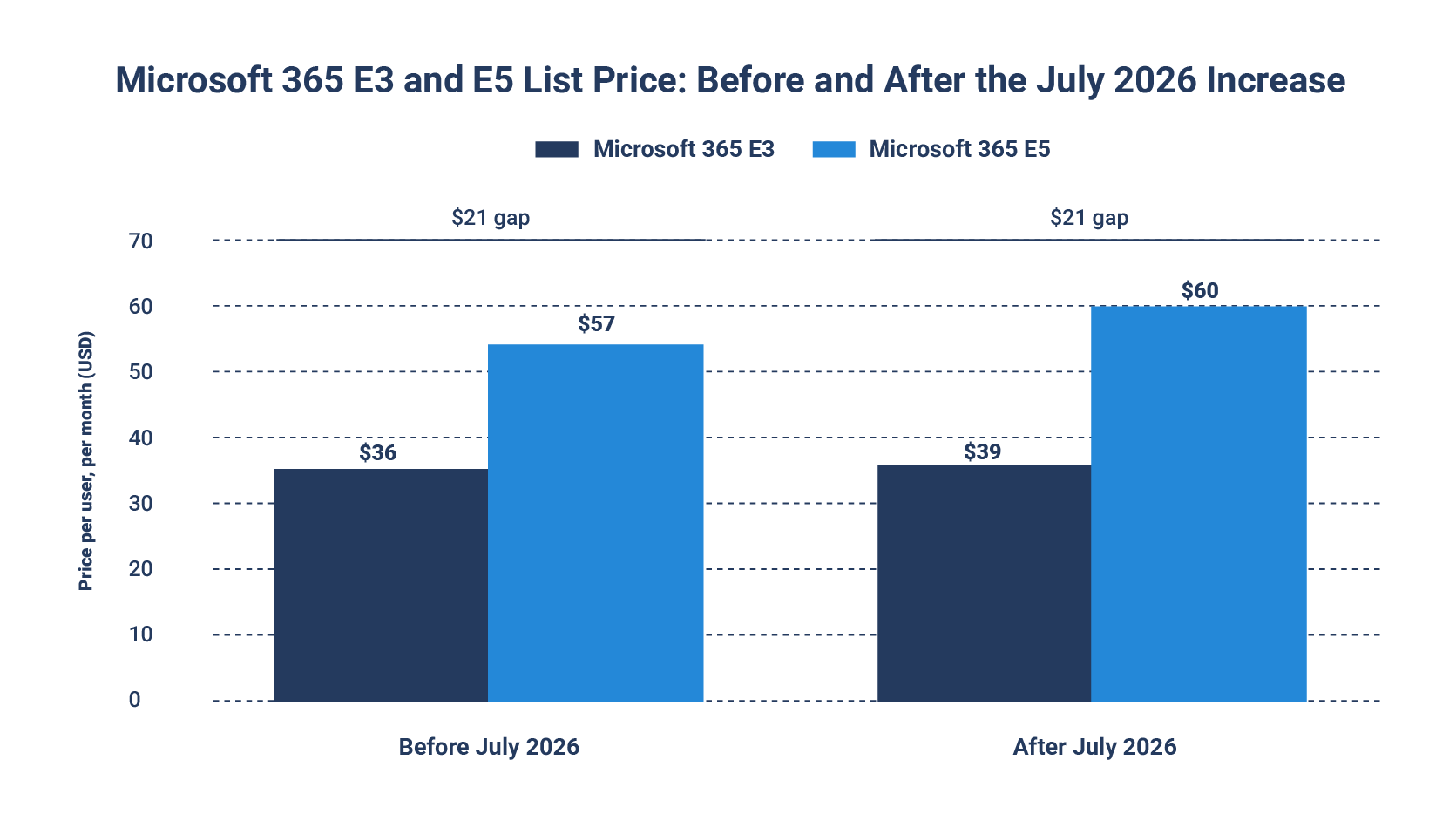
With both prices up, the question buyers face is unchanged: is the $21 premium worth paying on every seat? On paper, E5 is the better product: it includes everything in E3, plus a full security, compliance, and analytics stack. Whether that's worth $21 more per seat depends on how much of it your organization would actually use.
What Did July 2026 Actually Change in E3?
Before comparing what E5 adds, it helps to know what E3 already includes, because the July 2026 update moved real ground there. Microsoft 365 E3 covers the core productivity stack: Office apps, Exchange Online Plan 2, SharePoint Online Plan 2, Microsoft Teams, Entra ID Plan 1 (conditional access, MFA, single sign-on), Defender for Endpoint Plan 1, and the Windows 11 Enterprise E3 edition.
The timeliest change in the July 2026 update is Defender for Office 365 Plan 1 moving into E3 at no added cost. This includes Safe Links, Safe Attachments, anti-phishing with impersonation protection, and real-time detections, capabilities that previously required either an E5 upgrade or a separate add-on. Organizations currently paying for that add-on on top of E3 can retire it. Organizations that rely on baseline Exchange Online Protection now have a meaningfully stronger email security floor without changing tiers.
Intune moved too, though not as far as it might first appear. Microsoft 365 E3 already included Intune Plan 1 through Enterprise Mobility + Security (EMS) E3, one of the suites bundled inside it. In July 2026, Microsoft added the full Intune Plan 2 (Microsoft Tunnel for MAM, firmware updates, and specialty device management), plus Remote Help and Advanced Analytics, to EMS E3.
Because EMS E3 is part of Microsoft 365 E3, those capabilities now come with the E3 license instead of a separate Intune add-on. E5 goes further: Endpoint Privilege Management, Microsoft Cloud PKI, and Enterprise Application Management remain exclusive to E5 and E7. A team that needs just-in-time local admin rights or certificate lifecycle management at scale will not get there on E3 alone.
Together, these two changes narrow the gap that are used to justify E5 for email protection or basic device management alone. They don't close it.
Microsoft 365 E3 vs. E5, as of July 2026
What You're Actually Buying at $21 More
Grouped by function, E5 adds four categories of capability on top of E3.
Advanced security: Defender for Endpoint Plan 2 replaces basic antivirus and attack surface reduction with full endpoint detection and response, automated investigation, and threat hunting. Defender for Identity watches Active Directory and Entra ID for lateral movement and credential theft. Defender for Cloud Apps adds shadow IT discovery and cloud app control. Entra ID Plan 2 adds Privileged Identity Management for just-in-time admin access and risk-based Identity Protection on top of E3's baseline conditional access.
Advanced compliance: Insider Risk Management and Communication Compliance monitor for policy violations and data risk from inside the organization rather than outside it. eDiscovery Premium adds custodian management, predictive coding, and review workflows that eDiscovery Standard doesn't include. Advanced Audit extends retention well beyond E3's standard window, which matters for organizations with longer regulatory look-back requirements.
Voice: Teams Phone System and Audio Conferencing are included in E5. On E3, both are separate purchases, and Teams Phone typically needs a calling plan on top of the base license to handle external calls.
Analytics: Power BI Pro is included in E5. On E3, it's a standalone subscription.
What Does It Cost to Buy Only The Specific E5 Capabilities You Need?
Take the core Defender security stack: Defender for Endpoint Plan 2 at roughly $5.20 per user, per month, Defender for Office 365 Plan 2 at roughly $5.00, Defender for Identity at roughly $5.50, and Defender for Cloud Apps at roughly $5.00. Added together, the standalone total comes to about $20.70, within thirty cents of E5's $21 premium, a comparison first modeled by Atonement Licensing's Defender XDR pricing analysis.
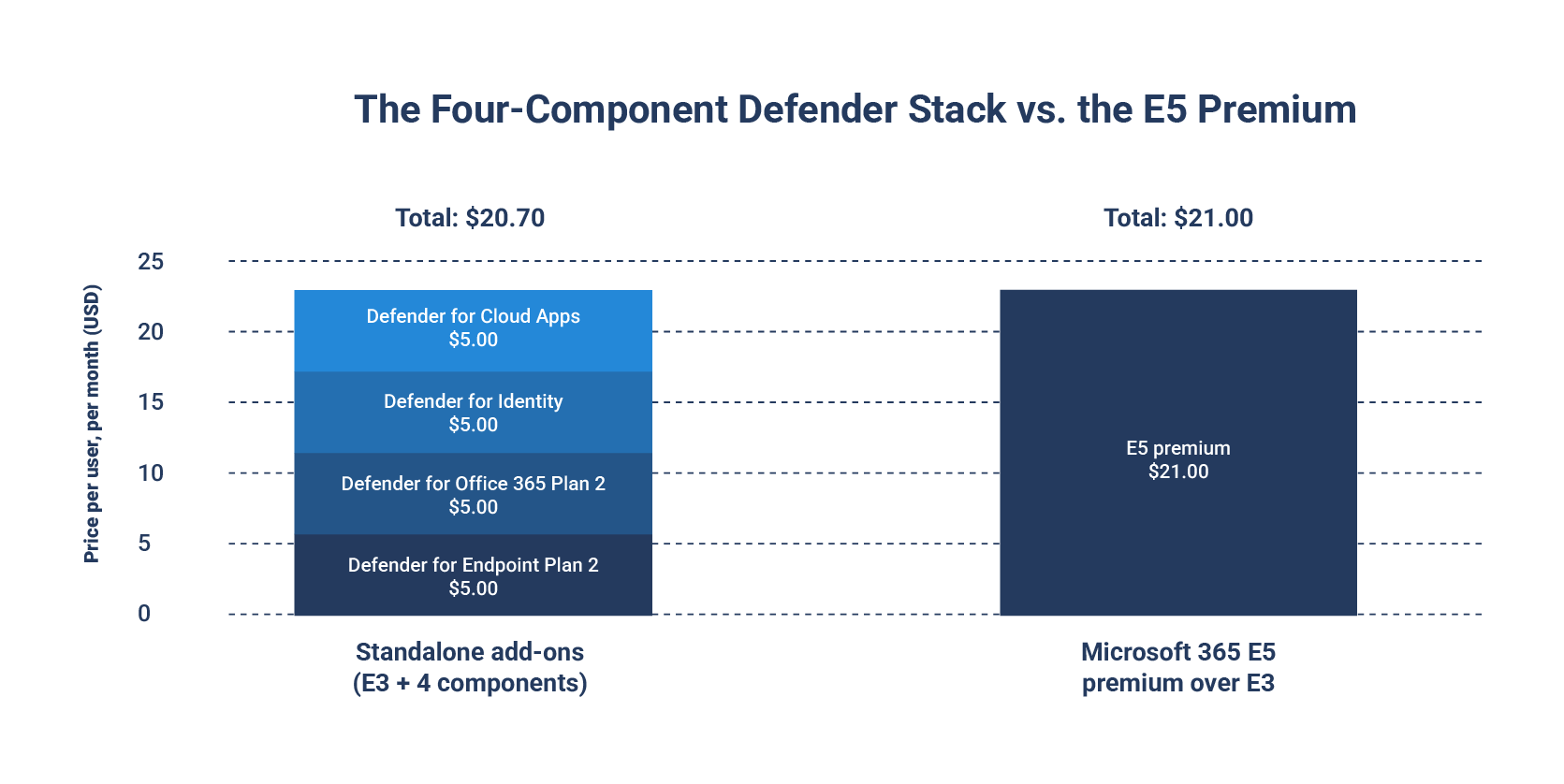
At that point, the deciding factor comes down to usage and need. An organization actively running all four Defender components pays about the same either way, and E5 wins on simplicity: one SKU and one renewal instead of four separate ones. An organization running only two of the four spends roughly $10 to $11 per user standalone, half of E5's premium, while the rest of E5 (compliance tooling, Power BI Pro, Teams Phone) sits unused.
Microsoft also sells narrower bundles that split the difference. The E5 Security add-on, priced around $12 per user, per month on top of E3, packages the full Defender stack and Entra ID P2 together at a discount versus buying each piece separately. A comparable Purview compliance add-on runs about $12 as well. Stack both together and the total lands close to $63 per user, more than E5's $60, which only makes sense for an organization that needs the full security and compliance stack but genuinely has no use for Power BI Pro, Teams Phone, or Audio Conferencing.
This is the exercise a seat-level usage audit performs: a line-by-line comparison of what your organization uses against what it's paying for, seat by seat, department by department, rather than a checklist of what E5 includes.
When Is E5 Actually Worth It?
None of the above means E5 is overpriced or that E3 plus add-ons is always the smarter buy. For organizations with real regulatory exposure, broad E5 deployment matches the risk they're actually managing rather than exceeding it.
Healthcare organizations subject to HIPAA, financial services firms with FINRA or SEC recordkeeping obligations, government agencies, and any organization operating under an active legal hold or frequent litigation exposure have compliance requirements that map directly to E5-tier capabilities. Insider Risk Management and Communication Compliance exist specifically to catch policy violations and data risk from inside the organization, which is exactly the exposure regulated industries are required to monitor. For a legal team handling frequent litigation holds, eDiscovery Premium's predictive coding and review workflows keep a large review manageable instead of overwhelming. Extended audit retention matters directly to organizations with multi-year regulatory look-back requirements.
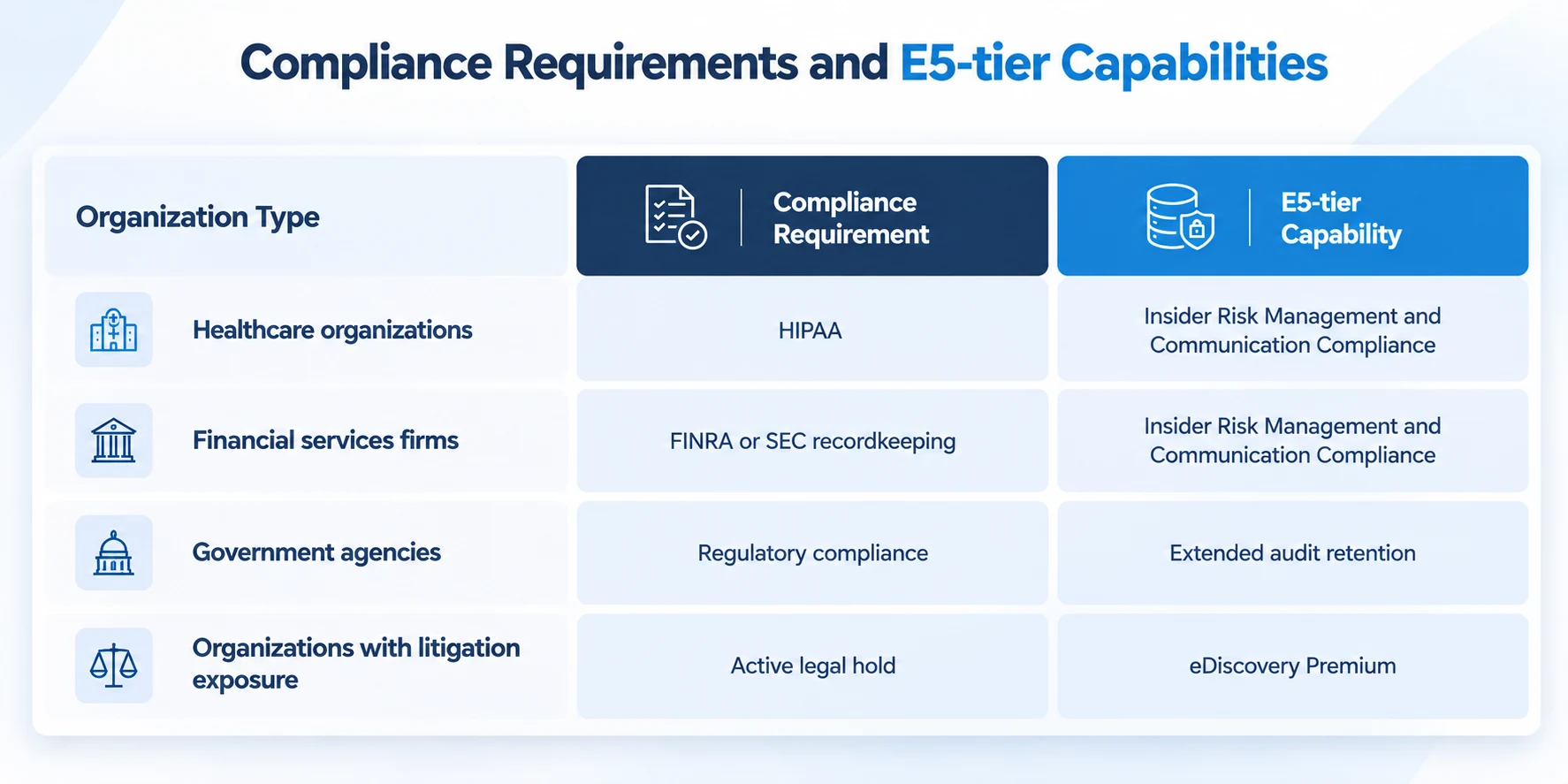
For these organizations, the real test is whether E3 plus a patchwork of individually licensed compliance add-ons, purchased department by department as gaps get discovered, is a defensible way to run a regulated environment. In most cases, it isn't. Broad, consistent E5 deployment gives compliance and legal teams a single governance model across the entire organization instead of a mix of coverage levels that depends on which department remembered to ask for which add-on.
The Real Waste Is Not Knowing What You're Using
Set the two paths side by side and a pattern emerges that has less to do with E3 or E5 and more to do with visibility.
The costliest outcome for most organizations comes from the extremes. One extreme is deploying E5 broadly and never configuring the premium capabilities that justified the cost: Insider Risk Management policies that were never built, Defender for Cloud Apps sitting in discovery mode indefinitely, Power BI Pro licenses assigned to people who never opened a report. The other extreme is staying on E3 and accumulating add-ons one renewal at a time, each one individually reasonable, without ever tallying whether that growing stack has quietly become more expensive than E5 would have been.
Both failure modes trace back to the same root cause. Nobody is tracking what's actually being used against what's actually being paid for. Fixing that requires visibility into real usage, seat by seat, before the renewal conversation starts, not a better guess at the next renewal.
Before You Renew Either Way, Know What You're Using
The $21 question has a different right answer for every organization, based on how many of E5's advanced security, compliance, voice, and analytics capabilities your users actually touch.

