
If your finance team runs on Dynamics GP, nothing breaks on January 1, 2030. GP will open, post and close the month the way it does today. What stops is everything that keeps it current: tax tables, payroll year-end changes, regulatory fixes and Microsoft support. Payroll is where most teams will feel it first.
That’s why December 31, 2029 isn’t the date to plan around. Moving to Business Central or Dynamics 365 Finance & Operations takes months to plan, test and cut over, and finance has only a few quiet months a year to go live. For most GP companies, the real deadline comes years earlier, and the cost of waiting starts well before it.
When does Dynamics GP support end?
Microsoft ends Dynamics GP support on December 31, 2029. After that date, GP receives no tax, regulatory or payroll updates and no standard technical support. Security updates, if needed, continue until April 30, 2031. Microsoft stopped selling GP to new customers in April 2025 (perpetual licenses) and April 2026 (subscriptions).
The Dynamics GP End-of-Support Timeline: Key Dates 2025 to 2031
In January 2025, Microsoft moved the end of GP support from September 30 to December 31, 2029. The Dynamics GP lifecycle page confirms that date for product enhancements, tax and regulatory updates and technical support, with security updates until April 30, 2031.

For existing customers, the 2025 and 2026 dates change little. Microsoft’s June 2025 guidance for GP customers says that from April 30, 2031, subscription licenses can no longer be renewed and perpetual users can no longer be added. The date that drives planning is December 31, 2029.
Check your GP version too. GP 2018 and 2018 R2 sit on an older lifecycle that ends January 11, 2028; installing any current tax release or hotfix moves you to version 18.5 or later and the 2029 date. GP 2016 support ended on July 14, 2026.
What Actually Changes After December 31, 2029
GP doesn’t stop working. What stops is Microsoft keeping it current.
Can you keep using Dynamics GP after 2029?
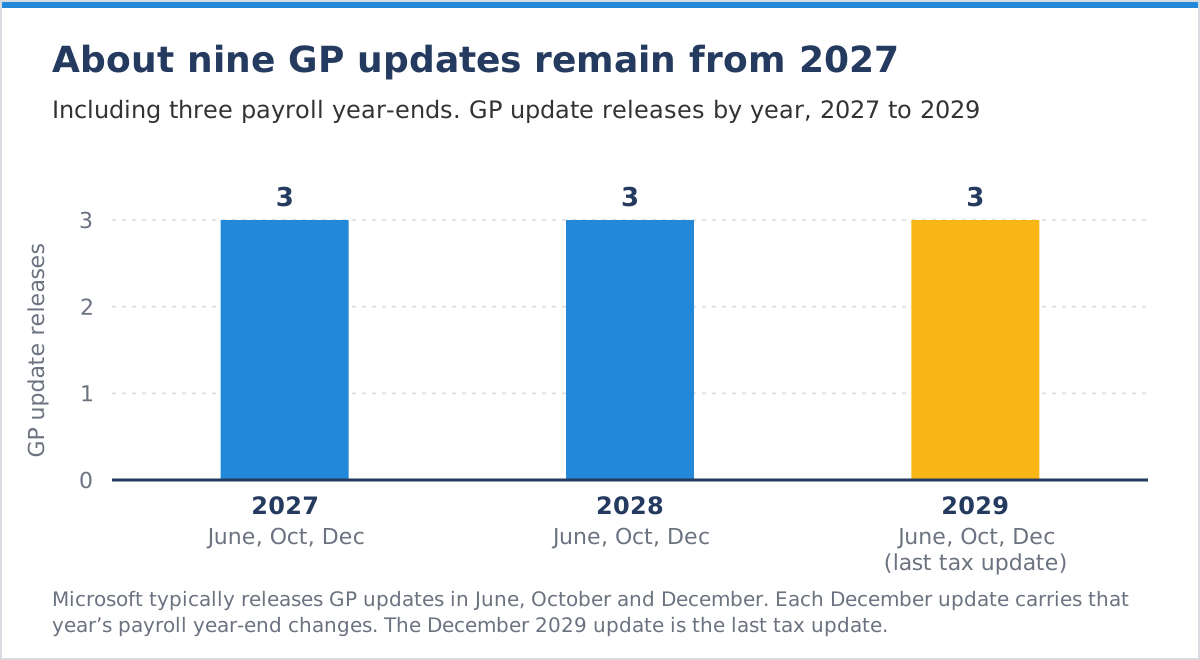
Yes. Dynamics GP end of support, often called GP end of life, does not switch GP off: GP keeps running after support ends and your data stays in your database. Microsoft stops sending the updates that keep GP current. Those updates typically arrive in June, October and December. Each one bundles hotfixes, tax updates and regulatory changes. The December 2029 update carries the last tax and payroll changes.
What happens to GP payroll after 2029?
Payroll is the first place the end of support shows up. Microsoft’s final tax update, due in December 2029, includes the payroll tax changes needed for January 2030 in the United States and Canada, according to Dynamics Communities’ summary of Microsoft’s announcement. The 2029 payroll year-end is the last one Microsoft updates GP for. From 2030, new tax tables, form changes and filing rules will have to come from somewhere other than Microsoft.
What else ends after 2029?
Microsoft stops handling GP support cases. Add-ons are the other exposure: most GP companies run them for payroll, sales tax, EDI or document management, and each vendor decides how long to support GP. Check every vendor’s plan against the 2029 date.
The risk builds in order: payroll and tax compliance first, then integrations and add-ons, then security after April 2031.
Why Your Real Deadline Is Earlier Than 2029
Your practical deadline is the latest date you can start a migration and still go live in a quiet month with time to fix problems. Five factors pull that date forward: project length, cutover windows, licensing, AI features and partner capacity.
How long does a GP to Business Central migration take?
Stoneridge Software, a Microsoft partner, says a GP to Business Central project can take anywhere from 12 weeks to over a year, depending on scope. Planning and data cleanup come before that clock starts, and testing runs inside it.
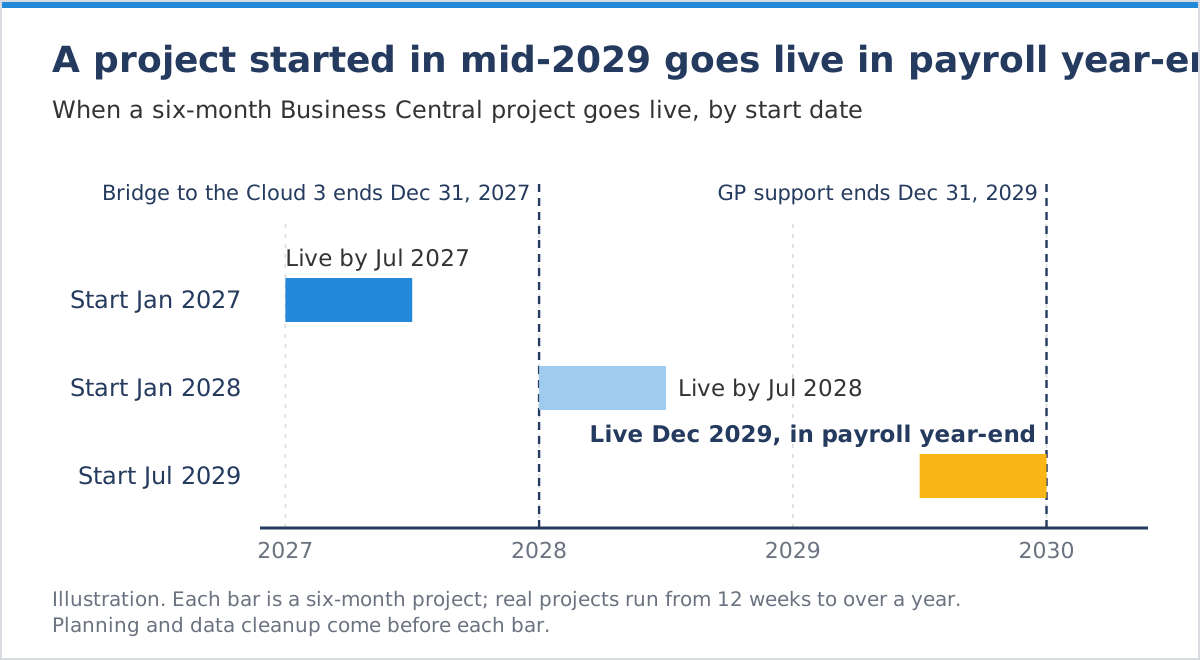
Cutover windows. Microsoft’s migration process has you stop using GP before the final database backup and wait to use Business Central live until the migration completes. That pause needs a quiet period. Most finance teams avoid going live during fiscal year-end close, an audit or payroll year-end.
Licensing. Microsoft’s Bridge to the Cloud 3 promotion runs from January 1, 2026, to December 31, 2027. Eligible GP customers can keep using GP alongside Business Central while they transition, provided they are current on their GP enhancement plan. A project that starts in 2028 misses it. Microsoft publishes the full terms to partners, so confirm eligibility before you budget.
AI features. Microsoft states that Copilot in Business Central is available exclusively for Business Central online, and so are its agents, such as the Payables Agent and the Sales Order Agent. Every year on GP is a year without them.
Partner availability (DCG’s view). Many GP customers will look for migration help in the same few years before 2029. Companies that start late will have less choice of partner and schedule.
Your Four Options Before Dynamics GP Support Ends
Every GP customer ends up on one of four paths. The right one depends on business complexity and the time left before 2029.
Should you move from GP to Business Central or Dynamics 365 Finance?
For most mid-sized GP customers, Business Central is the natural destination. Microsoft recommends it for GP customers and builds a GP migration tool into it. Dynamics 365 Finance & Operations fits companies whose entity structure, supply chain or transaction volume needs more than Business Central offers. Whichever you choose, the next decision is whether to run it in the cloud or on-premise.
What to Decide Before You Migrate from Dynamics GP
Decide which parts of GP to keep, fix or retire before you move, rather than lifting and shifting GP as it is. Most GP systems have collected years of workarounds: custom fields, add-ons, spreadsheets and manual steps added as the business changed. Copied into Business Central, they produce a new system that works like the old one. Start with how the business needs to work today, then decide what to fix, extend or replace.

Customizations and add-ons
List every customization and third-party product in GP, along with the job each one does. Standard Business Central, Power Platform or a current add-on may already cover the same job.
Data scope
Microsoft’s GP migration tool moves master records, open transactions at their remaining balances, open purchase orders, inventory quantities and summary general ledger history. Detailed history can go into an optional snapshot for Power BI reporting. Open balances only means a simpler cutover and shorter testing. Full detail keeps more history for auditors but needs more cleanup and validation.
Payroll
Decide the payroll path early. Microsoft’s migration tool does not list payroll among the data it moves. Business Central brings payroll into the general ledger by importing transactions from a payroll provider. GP payroll users need to choose that provider and set it up within the project.
Reporting and manual work
Rebuild only the reports people actually use, in Power BI. Fix the spreadsheets, re-keying and email approvals around GP rather than moving them.
Dynamics GP Migration Planning Checklist
Use these eight steps to turn the GP deadline into a plan:
- Inventory customizations and add-ons, with the job each one does.
- Decide the payroll path and choose the provider.
- Set the data scope: open balances or full history.
- Map every integration that sends data to GP or reads from it.
- Define the reports the business uses and plan them in Power BI.
- Confirm licensing and Bridge to the Cloud 3 eligibility before December 31, 2027.
- Pick a cutover window away from fiscal year-end, audits and payroll year-end.
- Choose a partner who diagnoses before they migrate.
How DCG Helps GP Customers Move
DCG diagnoses before it migrates. Our consultants first look at which processes GP supports well, which depend on workarounds and which add-ons still earn their place. We then plan the data scope, payroll path, integrations and a cutover window that avoids finance’s busiest weeks, and design the new system around how the business works today.
For Paris Brothers, a Kansas City specialty food and logistics company, DCG delivered Business Central under budget and integrated it with the company’s warehouse management system, transportation systems and centralized analytics.
When Should You Start Planning Your GP Migration?
Start planning in 2027. GP keeps running after 2029, but its compliance updates end in December 2029, Bridge to the Cloud 3 closes at the end of 2027 and a migration can run over a year. A plan made in 2027 leaves room to use the promotion, pick a quiet cutover window and fix workarounds along the way.
Still on GP? Talk to a DCG expert about your move before 2029.

