

Microsoft support tickets take too long for school and college IT teams because triage-heavy support puts intake, queueing, and repeated evidence requests ahead of specialist diagnosis. Small district and campus teams feel that delay most, because the same few people gather the same evidence at every handoff while the school calendar keeps moving.
If you run technology for a school district or college, you do it for the students and teachers you serve. When sign-in fails on the first day of school, you don’t see a ticket number. You see a student who can’t open an assignment and a teacher starting class without the lesson. The start of the year is already your busiest stretch: one Georgia district logged 3,893 tickets in six days after its fall semester began (GovTech). Every hour a Microsoft ticket waits, they wait too.
A Fast Reply Isn’t a Fix: Response Time vs. Resolution Time
Microsoft defines initial response time as the time until an engineer contacts you and starts working. Microsoft Unified Support, which replaced Premier Support, publishes initial response targets by severity for its Unified Enterprise plan and lists no resolution targets. A quick acknowledgement doesn’t start class on time; an engineer who owns the problem does.
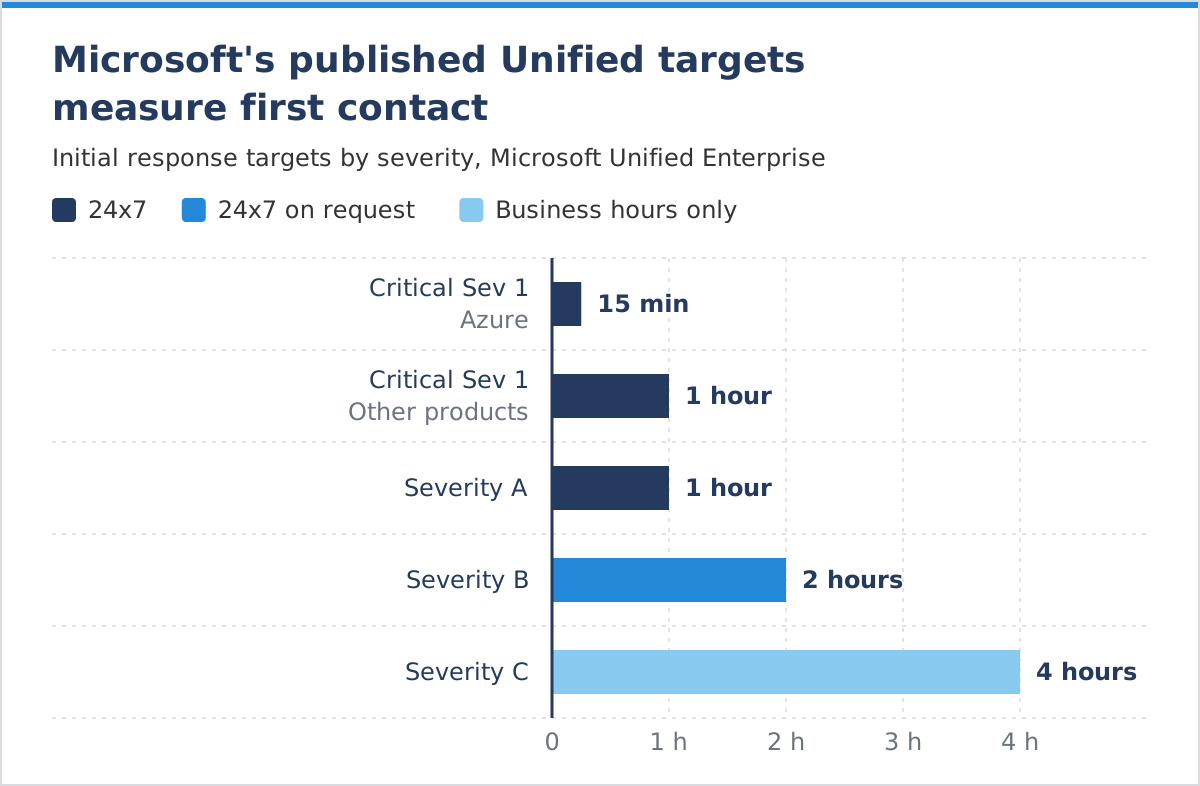
Two details weigh heavily on small teams:
- Severity A expects round-the-clock engagement from you. Microsoft asks customers to stay engaged 24x7 on Severity A cases and may lower the severity if they can’t. Two IT generalists can’t staff that.
- Lower severities run on business hours. Severity C is handled during business hours only, generally 09:00 to 17:30. Severity B gets 24x7 handling only on request, if your team commits to continuous work.
Where the Hours Go Before an Engineer Starts Work
Tiered support lets a large provider run one shared queue. For a district or campus, it means slow routing and a long mean time to repair (MTTR). A typical ticket moves through five stages:
- Intake: your team gathers logs, scope, timestamps, tenant details, and reproduction steps.
- Queueing and routing: the case gets a product area and severity lane.
- Re-triage and handoffs: validation starts over with each new owner.
- Engineer analysis: a specialist who knows the workload begins diagnosis.
- Fix and validation: the fix is applied, tested, and documented.
Every hour in the first three stages is an hour before diagnosis starts. Tickets That Took Too Long walks through the same pattern in large enterprise Microsoft environments.
Why Small School and College IT Teams Feel Every Delay
Small districts and colleges often run their entire Microsoft environment with a few generalists. In CoSN’s U.S. State of EdTech 2026 report, a survey of 607 district technology leaders, 78% of very small districts (fewer than 1,750 students) reported only one to three full-time-equivalent IT staff.
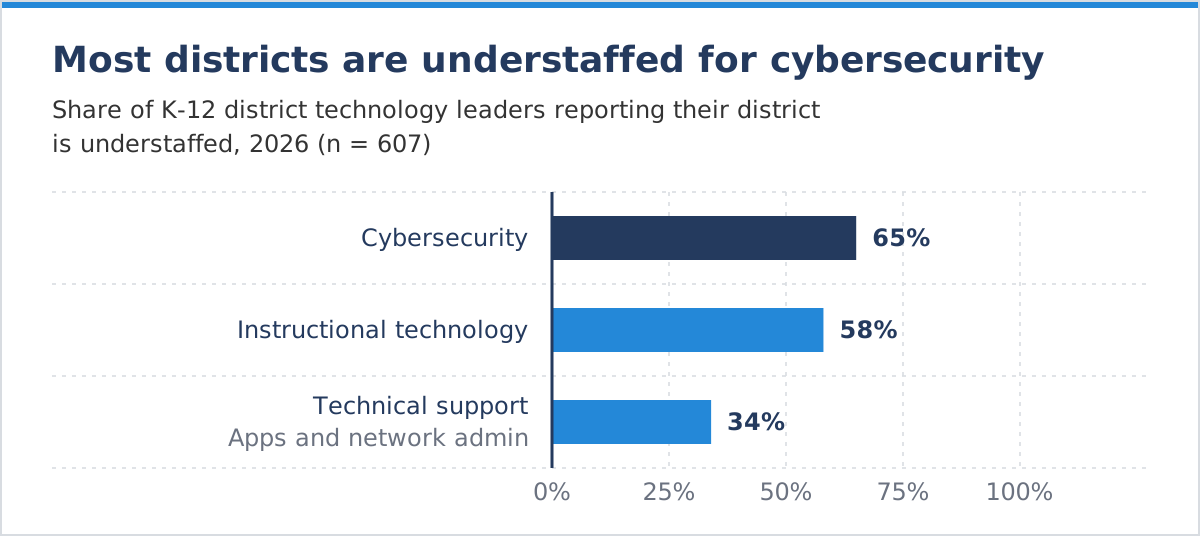
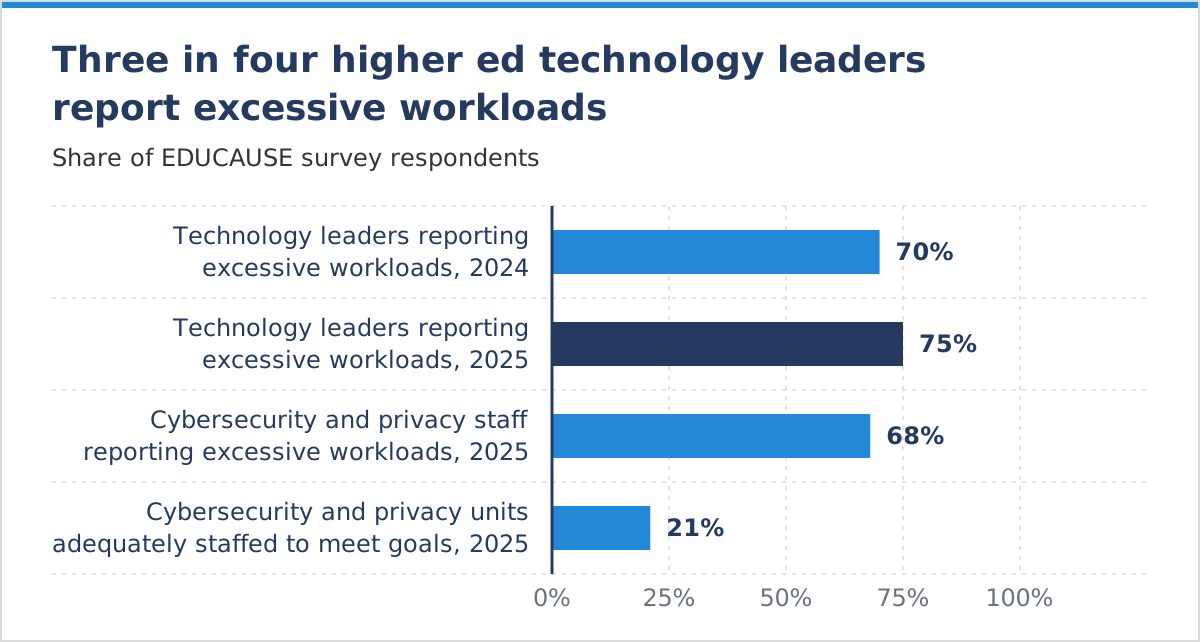
In the 2025 EDUCAUSE Technology Leadership Workforce report, three quarters of technology leaders called their workloads excessive, up from 70% (EdScoop). In EDUCAUSE’s 2025 cybersecurity and privacy workforce study, only 21% of respondents said their unit had enough staff to meet its goals (EdTech Magazine).
On a two- or three-person team, the same people own identity, the LMS, the student information system (SIS) integration, devices, and the network. Each request to resend logs pulls one of them away from a classroom, the help desk, or a security alert.
What Is Time to Engineer? How to Measure the Wait
Time to Engineer is the time from ticket submission until a specialist who knows the affected workload is actively troubleshooting it. Acknowledgement times hide that wait, and the common incident metrics each show only part of it.
MTTR includes the time a ticket spends waiting, but it doesn’t show where that time went. Once Time to Engineer is written into a support agreement, queue and re-triage time show up in every ticket report.
What a Stalled Ticket Costs Students, Teachers and Deadlines
A long ticket costs schools and colleges in two ways:
- Fixed academic calendars. Testing windows, registration, finals, and grading run on set dates. During a nationwide LMS outage in May 2026, the University of Illinois postponed every exam scheduled that weekend (Associated Press via Santa Monica Daily Press).
- FERPA deadlines. Schools must give parents or eligible students access to education records within 45 days of a request, and some states set shorter limits (U.S. Department of Education). A ticket that sits in re-triage for a week uses about a sixth of the federal window.
Three Tickets That Took Too Long: Registration, Finals and Records
These are anonymized composite scenarios based on common patterns in K-12 and higher education Microsoft environments.
Registration Week: New Students Can’t Sign In
Symptoms: New students and advisors intermittently fail to sign in to the SIS through single sign-on.
Why it stalls: First-line support starts with password resets, but the cause sits in Conditional Access, new-student MFA registration, and Microsoft Entra ID federation with the SIS.
Delay pattern: Day 0 goes to collecting sign-in logs. On day 1, test accounts sign in fine because they bypass the new-student path. The case escalates on day 2, after the registrar has extended registration.
Outcome: Registration recovers through your team’s own workaround. Root cause analysis falls behind, so the failure can return next term.
Finals Week: The LMS Slows to a Crawl
Symptoms: An Azure-hosted LMS times out and drops quiz submissions during peak exam hours.
Why it stalls: Each handoff requests the same timestamps, correlation IDs, and flow logs again. The case swings between a configuration theory and a platform theory, and both are plausible: in October 2025, an Azure Front Door change disrupted Azure and Microsoft 365 for hours.
Delay pattern: Load drops after exam hours, so reproduction attempts come back clean.
Outcome: Faculty reschedule exams while the ticket changes hands.
Records Week: Students Lose Access to Their Coursework
Symptoms: After a schedule change, some students lose access to class Teams and assignments, the same week the records office is working on a FERPA request.
Why it stalls: School Data Sync (SDS) maps SIS identifiers to Microsoft Entra identities. A sync can finish while some students’ enrollments drift, which scripted first-line steps rarely catch.
Delay pattern: Scripted steps and repeated data requests fill days 0 to 1, and escalation comes on day 2 or 3. The fix may be quick, but most of a school week has gone.
Outcome: The ticket lasts far longer than the fix required, while the compliance clock keeps running.
All three tickets stall for the same reason. Triage-first support delays access to engineers who know the affected workload, and small education IT teams absorb every hour of that delay.
Why Your Support Bill Rises When Your Licensing Does
Since July 1, 2024, Microsoft no longer offers Premier Support to renewing public sector customers, including education, and recommends Unified Support instead. Unified Support is priced as a percentage of your previous 12 months of Microsoft spend, with a published minimum of $50,000, and resets at each renewal. When a district expands Microsoft 365 licensing or a university adds Azure research workloads, next year’s fee rises with that spend whether or not ticket volume changed.
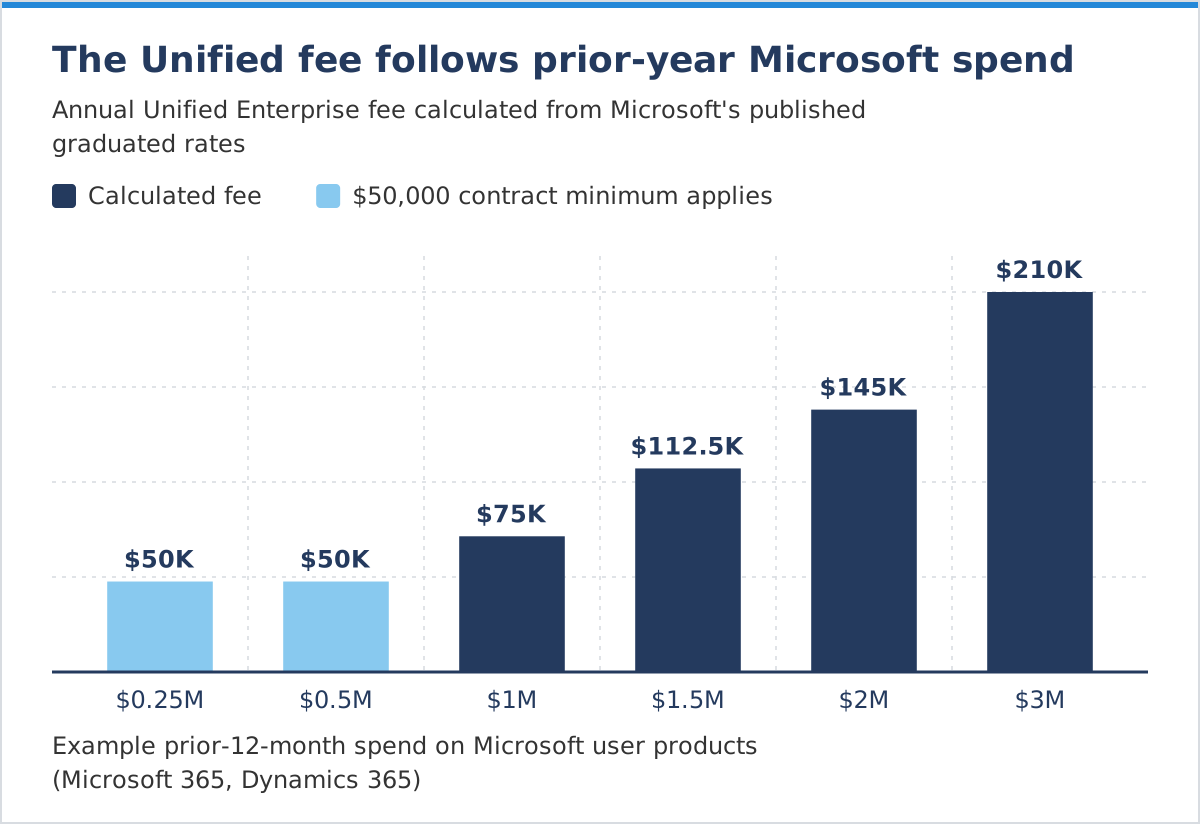
Calculated from Microsoft’s published rates for user-based products such as Microsoft 365. Azure and on-premises spend are priced differently, and negotiated agreements may differ.
Under Microsoft’s rates, any annual spend on user-based products below about $667,000 lands on the $50,000 minimum. Boards and trustees approve budgets a year ahead, so a fee that resets with unrelated licensing decisions becomes a line item someone has to defend. If your district has no Unified Support contract and opens tickets through the Microsoft 365 admin center or a reseller, the same triage stages still apply.
How DCG’s Microsoft Enterprise Support Gets an Engineer on Your Ticket Sooner
DCG’s Microsoft Enterprise Support is a partner-led support model built to shorten queue time and limit handoffs, so your team can get back to its students and staff. It changes five things:
- Direct-to-engineer routing: a specialist starts work early in the ticket timeline.
- Time to Engineer SLA: the first engagement is tied to active troubleshooting.
- One consistent point of contact: your team explains its environment once.
- Root cause analysis: issues that recur each term get fixed at the source.
- Usage-based pricing: your fee is built around the support you expect to use, not your total Microsoft spend.
The global health nonprofit FHI moved its Microsoft support to DCG after slow resolutions and inconsistent service. Tom Maloney, its Director of Infrastructure and Operations, reported “a dramatic improvement in the quality and responsiveness” of its Microsoft support.
Frequently Asked Questions
Our Microsoft ticket has had no update for a week. What can we do?
Check the severity first: Severity C is worked during business hours only. If testing or registration is now affected, ask Microsoft to raise it, and send one complete set of logs so nobody starts over.
Our Unified Support renewal went up, but we opened fewer tickets. Why?
Unified Support is priced from your previous 12 months of Microsoft spend, not your ticket volume. New Microsoft 365 licenses or Azure workloads raise next year’s fee even if you used support less.
How do we stop resending the same logs to every new engineer?
Keep one case file with affected users, timestamps, correlation IDs, logs, and steps already tried, and attach it at every handoff. The lasting fix is one consistent point of contact who knows your environment.
Checklist: Is Your Support Model Making Tickets Take Longer?
Use these questions to judge whether long ticket duration at your district or campus is a one-off or a predictable result of your current support model.

