
In July 2024, Microsoft stopped renewing Premier Support for public sector customers, including education, and directed them to Unified Support, a model that prices support as a percentage of total Microsoft spend rather than actual usage. For institutions running on fixed, public or tuition-funded budgets, the shift ties a growing cost to enrollment and licensing decisions the business office does not control.
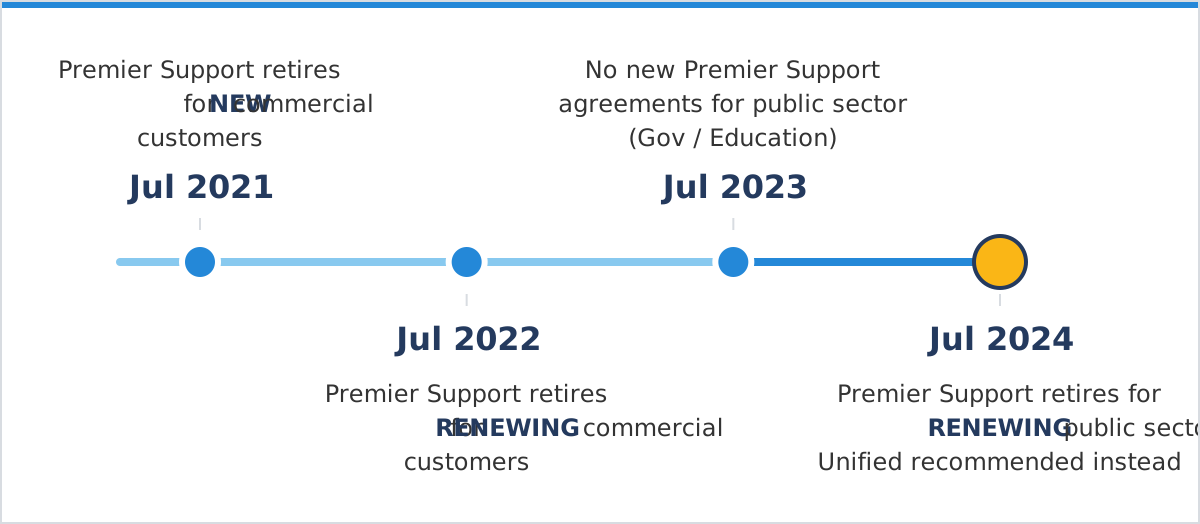
Between 2022 and 2024, education and government institutions were the last Microsoft customers still buying support the old way: a contracted block of support hours, sized to the institution’s needs. As of July 2024, Premier is closed to commercial and public sector customers alike. For the wider picture of what changed, see DCG’s education guide to the Microsoft support cycle.
1. Why Education Buyers Are Looking at Alternatives Right Now
Three things are happening at once.
The Pricing Mechanism Itself Changed
Hours-based pricing tied an institution’s support cost to the support it planned to use. Spend-linked pricing ties the cost to total Microsoft spend, including Azure consumption, Microsoft 365 licensing, and on-premises Software Assurance, regardless of ticket volume. An institution that never opens a single reactive case still pays more every time its licensing footprint grows.
Education Budgets Are Not Built to Absorb a Variable Line Item
Public and tuition-funded institutions build support costs into fixed annual budgets, set through legislative appropriation cycles, board approval, or bond covenants that do not move mid-year. A vendor-set formula that recalculates the bill based on the institution’s own purchasing activity works against that structure.
For K-12, This Landed Alongside a Separate Funding Cliff
School districts had until September 30, 2024, to obligate federal Elementary and Secondary School Emergency Relief (ESSER) funds, the same money many districts used for pandemic-era device rollouts and technology purchases. In 2023, The Education Trust projected that ESSER’s expiration and declining enrollment together could cut roughly $1 million from an average 850-student high school’s 2024-25 budget. Districts on Unified contracts now face a support cost that rises with their Microsoft spend in the same years that emergency funding disappeared. Districts that buy support through a reseller instead of Unified feel the same budget squeeze, with fewer options when a case stalls.
The practical response is to look closely at how you buy support inside Microsoft’s ecosystem while staying on Microsoft.
2. How Unified Support Pricing Works for Education Institutions Now
Microsoft Unified Support is priced as a percentage of an institution’s previous 12 months of Microsoft spend, on graduated tiers that start at 7.5% for Microsoft 365 and other user products and 10% for Azure, with a $50,000 annual minimum. Microsoft publishes the mechanics directly. The spend base is the previous 12 months of cloud services such as Microsoft 365 and Dynamics 365, Azure consumption (after discounts and before credits, excluding Marketplace), license-only purchases, and Software Assurance. Each product group is calculated on its own graduated schedule, starting from its own first tier: one for Modern Work, Business Applications, and on-premises user products, and one for Azure and on-premises server products. The rate steps down as spend crosses each threshold, and the minimum annual contract is $50,000. The plan details list no education-specific rates or discounts.
| Tier | Modern Work / Biz Apps / On-Prem User | Azure / On-Prem Server |
|---|---|---|
| 1 | Up to $1.5M: 7.5% | Up to $1.8M: 10% |
| 2 | $1.5M-3M: 6.5% | $1.8M-6M: 7% |
| 3 | $3M-6M: 5.5% | $6M-12M: 5% |
| 4 | $6M-15M: 4.5% | $12M-30M: 3% |
| 5 | Over $15M: 3.5% | $30M-60M: 2.25% |
| 6 | N/A | $60M-120M: 2% |
| 7 | N/A | Over $120M: 1.75% |
Microsoft’s published Unified Enterprise rates, effective for contracts starting February 1, 2023, or later.
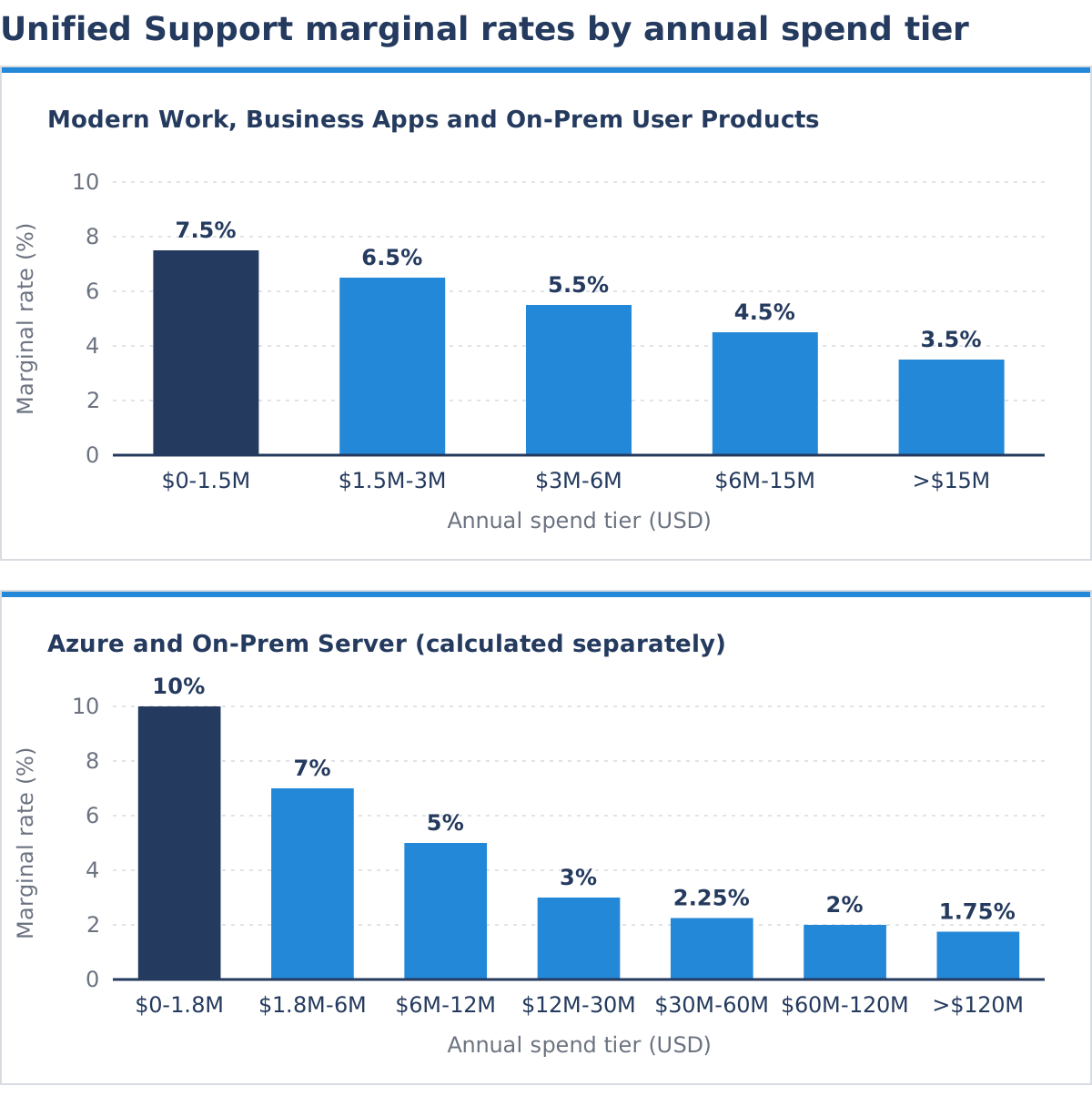
The mechanism works on a marginal basis, similar to income tax brackets: only the portion of spend inside each tier is charged at that tier’s rate. The base itself, total qualifying Microsoft spend, is set entirely by the institution’s own purchasing. An institution can hold ticket volume flat for three years running and still see its Unified Support renewal increase every one of those years, purely because its Microsoft 365 or Azure spend grew.
3. Renewal Creep on a Fixed Budget: The Cost-Per-Student Reality
For an education finance office, “spend grew” usually means “enrollment grew” or “we finished a device refresh,” decisions made for academic reasons rather than procurement ones. Under Unified Support, those same decisions now carry a second, compounding cost.
EDUCAUSE’s Core Data Service, the standard benchmarking source for higher education IT, has tracked median central IT spending per student climbing from $1,316 in fiscal year 2020-21 to $1,601 per student FTE in fiscal year 2022-23, a 21.7% increase in two years. In 2022-23, median total central IT budgets stood at $10.6 million, ranging from $4.8 million at the 25th percentile to $25.3 million at the 75th. EDUCAUSE separately named “Balancing Budgets” one of higher education IT’s top ten issues for 2024.
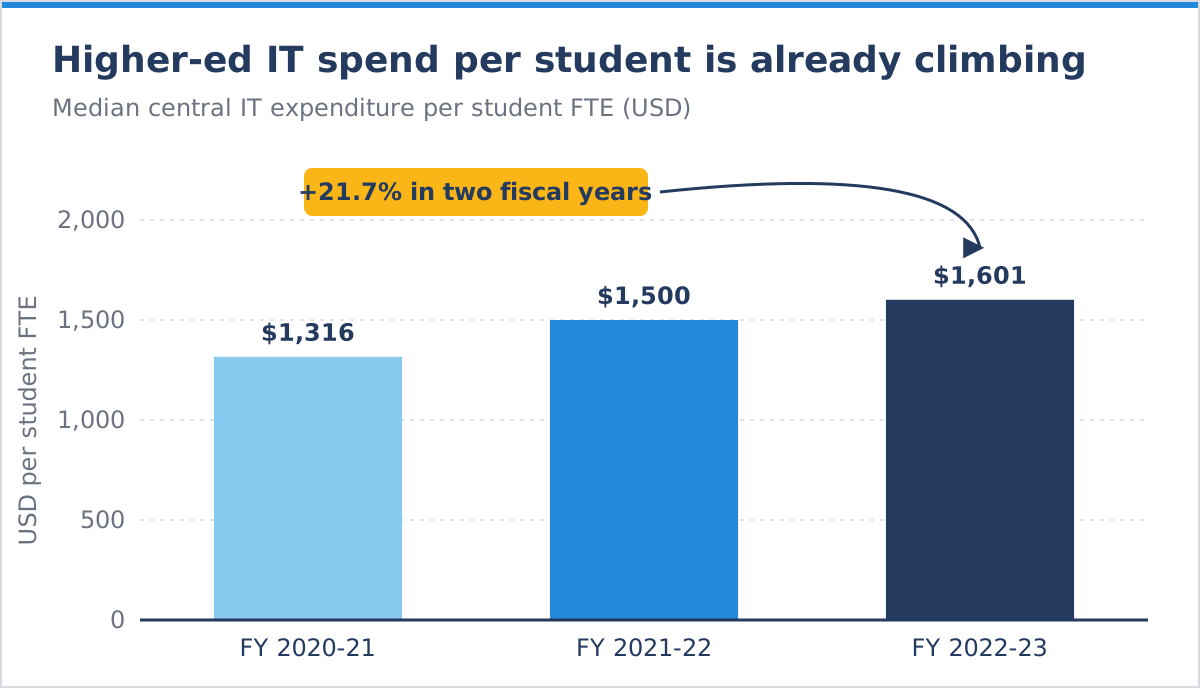
The FY2020-21 figure comes from an earlier EDUCAUSE benchmark release, so its sample differs from the later two years.
Unified Support pricing compounds directly into that per-student number because the fee is calculated as a percentage of the same Microsoft spend that grows every time an institution adds seats, licenses, or cloud consumption. The example below applies Microsoft’s published rate schedule to a hypothetical institution. It illustrates the mechanism; it is not any client’s actual bill.
Example
An institution with $12M in annual Modern Work / Microsoft 365 / on-premises user spend pays an estimated $645,000 in Unified Support fees under Microsoft’s published tiers. If that spend grows 10% to $13.2M (a routine enrollment or licensing increase), the fee rises to an estimated $699,000, an 8.4% increase in the support line with no change in support usage. Spread across 25,000 students, that is a shift from roughly $25.80 to $27.96 per student in a single renewal cycle, before any conversation about how much support was actually consumed.
Smaller districts feel the minimum instead. A district with $300,000 in Microsoft 365 spend would calculate about $22,500 at 7.5%, but pays the $50,000 minimum, an effective rate of nearly 17%.
To run this math on your own numbers before the renewal notice arrives, use DCG’s Unified Alternative Calculator. It applies the same published rate schedule to your actual Microsoft spend.
4. Two Segments, Two Sets of Pressure
Higher education and K-12 feel this shift through different budget structures, governance models, and funding cycles.
| Pressure | Higher Education | K-12 |
|---|---|---|
| Budget and governance | Governance runs through boards of trustees, university systems, and (for public institutions) state legislative appropriations, all on annual or biennial cycles set before a Unified Support renewal increase is known. | District technology budgets are typically set through local or state funding formulas tied to enrollment counts and property tax cycles, with far less flexibility than a university’s mixed revenue base. |
| What drives Microsoft spend | Microsoft spend concentrates differently than K-12. Large Enterprise Agreements, research-computing Azure consumption, and multi-campus or system-wide licensing make up a big share of higher-ed spend. As a result, the infrastructure-side rate schedule often carries as much weight as the user-license side. | Microsoft’s K-12 licensing program prices mainly by staff FTE count and, for some products, student enrollment, not by device. So staffing growth, and for some products enrollment growth, raises the Microsoft spend base that Unified Support’s fee is calculated against, without any new technology decision. |
| Scale and funding pressure | Median central IT spend already ranges from $4.8M to $25.3M depending on institution size, so the dollar impact of a spend-linked support fee scales with an institution’s own research and cloud footprint. | Many districts lost the federal ESSER relief that had cushioned technology costs the same year Premier Support retired. |
Both segments reach the same conclusion from different directions: a support cost tied to purchasing activity, inside a budget that cannot move with it.
5. What Restores Control: A Needs-Based, Partner-Led Support Model
Unified Support’s invoice shows a total. It does not show what the institution actually consumed against that total: how many cases were opened, how they were resolved, or whether the fee paid for capacity that went unused. For a business office defending a cost increase to a board, a state auditor, or a taxpayer-facing budget hearing, “the formula requires it” does not hold up to that kind of scrutiny. Slow tickets add to the cost, as Why Microsoft Support Tickets Take So Long in K-12 and Higher Ed explains.
A needs-based model is familiar to education buyers. Before July 2024, Premier Support worked this way: institutions bought a block of support hours sized to their needs. A needs-based model brings that structure back.
For institutions evaluating what comes after Premier, look for a support partner built around five things:
- Transparent, usage-based pricing: a contract sized to the institution’s actual support needs, rather than a formula tied to total technology spend.
- Direct access to senior engineers: consistent, familiar engineering contacts from the first case forward.
- Case continuity and accountability: a named CSAM and case ownership that survives beyond a single ticket.
- Procurement-friendly contract terms: flexibility built for how public and tuition-funded budgets actually get approved.
- Licensing and enrollment guidance: help managing the Enrollment Agreement or CSP licensing that drives the Unified Support fee upward as enrollment and device programs grow, as the comparison guide sets out.
DCG’s Enterprise Support for Education is built on this model. DCG resolves 93% of cases in-house, which gives education clients direct access to senior engineers instead of a vendor escalation path. Like Premier, its pricing is sized to the support an institution expects to use. We recommend that education business offices and IT leadership evaluate a needs-based partner model before their next Unified Support renewal, not after the next cost increase arrives.

