


Dynamics 365 Integration: A Practical Guide to Connecting D365 the Right Way
Most D365 integration problems aren't technical, they're architectural. Organizations that wire systems together without a clear strategy end up with brittle pipelines, undocumented code and data problems that compound over time. This guide covers the full integration landscape: native connectors, the Web API, Power Automate, Azure middleware and the pattern decisions that determine whether your stack is manageable two years from now.
I get calls like this more often than I'd like. A distribution company reached out to us two years ago, not to build integrations, but to untangle ones they already had.
Seven of them. Four years of additions, one system at a time, each wired directly to D365 with custom code. The developer who built the first three was long gone. No documentation. Nothing beyond some commented-out code that nobody fully trusted. Every time they needed to connect to a new vendor system, someone had to spend three weeks reverse-engineering what the existing connections were actually doing before they could touch anything new. This clearly shows symptoms of an architectural problem that the company is going through.
D365 doesn't live in isolation. For most mid-market organizations, it needs to talk to a CRM, an eCommerce platform, a warehouse system, a payroll tool or some combination of all of the above. The question isn't whether to integrate. It's how. And that decision compounds faster than most people expect. Get the architecture right early and every system you add later slots in. Get it wrong and you spend the next three years paying for it in maintenance costs, outages and institutional knowledge that walks out the door every time someone leaves.
What follows covers the full integration landscape for D365: native connectors, the Web API, Power Automate, Azure middleware and the pattern decisions that actually determine whether your stack is manageable two years from now.
Native Connectors vs. Custom Development
The first question most teams ask is whether they can use a pre-built connector instead of building something custom. Good question. Short answer: sometimes. But "pre-built" carries assumptions worth examining before you commit to one
What Native Connectors Actually Give You
Microsoft's Microsoft Marketplace which was formerly AppSource, lists thousands of apps and integrations built to work with Dynamics 365. For common platforms like HubSpot, Shopify and standard payroll providers, pre-built connectors exist and, for the right use case, work reasonably well.
Where they work well is genuinely narrow: standard data flows, relatively low volume, no complex business logic, no custom fields that fall outside what the connector was built to handle. If your Shopify store uses default order structures and you need basic order sync into D365, a native connector will probably do the job. If you've customized your order workflow, added product attributes or need real-time inventory sync with conditional logic, you'll find the edge fast.
When Custom Development Is the Actual Answer
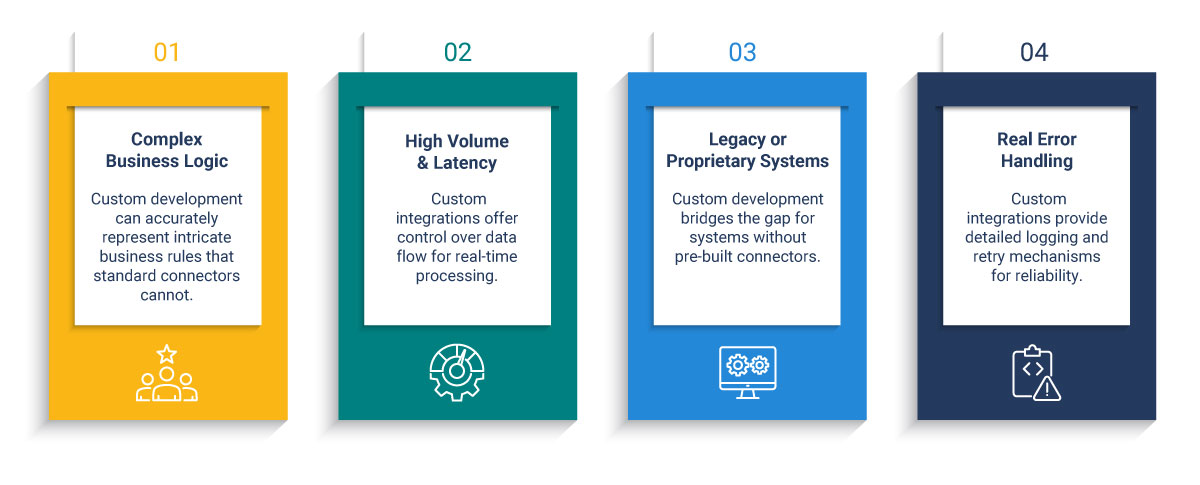
Custom integration earns its cost when your situation has any of the following:
- Complex business logic a connector can't represent. Pricing tiers, approval chains, conditional routing - if the rules live in your head and not in a standard schema, a connector will either ignore them or break on them.
- Volume and latency requirements. Pre-built connectors are rarely built for high-frequency, real-time data flows. If order confirmations need to land in D365 within seconds, you need control over the pipeline.
- Legacy or proprietary systems with no pre-built path. This covers a significant share of mid-market infrastructure: older WMS platforms, industry-specific ERPs, homegrown databases built before modern APIs were a consideration.
- Real error handling. Native connectors fail quietly. Custom integrations built properly log failures, retry intelligently and alert the right people when something breaks. That difference is enormous in production.
The argument that custom integration is "more expensive" is usually backwards. A poorly architected native connector that requires constant patching and breaks on every platform update costs more over time. The question is where do you want to pay? upfront in design, or indefinitely in maintenance.
For background on integration design patterns, see: Integration Design Patterns for Dynamics 365
Using the Dynamics 365 Web API and REST API
Most D365 integrations built via API are actually integrating with Dataverse - the cloud database that sits underneath D365's customer engagement applications including Sales, Customer Service and Field Service. The D365 Web API is the OData v4 REST interface that exposes Dataverse. Understanding that distinction matters before you build, because it changes how you handle authentication, throttling and data model design.
For D365 Finance & Operations, the integration surface is different: OData endpoints for real-time queries, the Data Management Framework for bulk operations and Business Events for event-driven workflows. Microsoft's F&O integration overview covers the full picture if you're working in that environment.
Authentication
Access to the Web API requires OAuth 2.0 authentication via Microsoft Entra ID (formerly Azure Active Directory). You register an app in Entra ID, configure permissions and request a bearer token before any API call can be made. In production environments, Microsoft recommends certificate-based authentication over client secrets - a step teams routinely skip when moving fast and pay for later in security audits.
The Throttling Reality
D365 enforces service protection API limits. The current threshold is 6,000 requests per five-minute window per user. That sounds generous until you're running a high-volume sync and realize a batch job is hitting the ceiling before it completes.
The step that gets skipped most often is the most important one: mapping the data before writing anything.
Field names don't match across systems. Data types conflict. One system stores customer IDs as integers, another as strings with a prefix. A field that's required in D365 is optional in the source system and sometimes left blank. These aren't edge cases, they're the normal state of any real-world data landscape.
Microsoft's own guidance on choosing the right integration pattern makes the same point: the pattern decision and the data design decision have to happen before any configuration begins.
Power Automate as a D365 Integration Layer
Power Automate is Microsoft's low-code automation platform and it's genuinely useful. It's also the most overextended tool in the D365 ecosystem. I've had this conversation with clients more times than I can count. Teams reach for it first because it's accessible, and it ends up carrying weight it was never designed for.
Power Automate is underused for what it's good at and overused for what it isn't. The problem isn't the tool- it's that nobody defined the boundary.
Use Power Automate for: internal workflow automation, approval triggers, notification routing, lightweight data lookups and departmental processes where the volume is low and the logic is simple. It handles these well. Non-technical teams can build and maintain flows without developer support. That's a real advantage worth preserving.
Don't use Power Automate for: system-to-system data integration at scale. It isn't built for high-frequency, high-volume or complex transformation scenarios. When you push it into those use cases - syncing thousands of records between D365 and an external system, managing bidirectional sync with conflict resolution, running real-time order pipelines, it will work until it doesn't, and debugging it at scale is miserable.
The cleaner rule: Power Automate for process automation inside your organization, custom API development for integration between systems. When you're unsure which bucket a use case fall into, ask whether a business user should be able to maintain it themselves. If the answer is no, you're in custom API territory. Stop trying to make Power Automate do that job.
Common D365 Integration Use Cases
D365 and Salesforce
This is one of the most common integration scenarios in the mid-market: D365 Finance or Operations handling the back office while Salesforce runs sales and CRM. The data flows that matter are accounts, contacts, opportunities, quotes, orders and invoices moving between the two platforms.
The problem most teams hit isn't technical - it's governance. Bidirectional sync creates conflict: the same customer record gets updated in both systems at roughly the same time. Which one wins? If you haven't defined the system of record before you build, you'll be answering that question in production under pressure while data is inconsistent across both platforms.
D365 and Azure Integration Services
For enterprise-grade D365 integrations, Azure provides the right middleware stack. Azure Service Bus handles message queuing and reliable delivery. Azure Logic Apps manage workflow orchestration. Azure Data Factory handles large-volume, scheduled data movement.
This isn't overkill for mid-market. It's the architecture that holds up when you move from connecting two systems to five. Point-to-point integrations work fine with two systems. At five, they become a maintenance problem. At ten, they're unmanageable. Azure middleware gives you a central integration layer that can grow with your stack without requiring you to rebuild it.
DCG's Azure Integration Services practice covers this architecture in detail for organizations ready to move past point-to-point connectivity.
D365 Finance & Operations Specifically
F&O has integration considerations that don't apply to the rest of the D365 family. It uses data entities along with abstraction layers that sit above the database tables and control what external systems can read and write. The Data Management Framework (DMF) handles bulk import and export operations. Business Events let F&O push notifications to external systems when something happens inside the platform.
Common F&O integrations: warehouse management systems, payroll, eCommerce platforms, EDI. High-volume batch imports should go through DMF, not the Web API - the throttling limits apply there too, and operations above a few hundred thousand records need to be handled asynchronously. The API is for real-time, lower-volume interactions. DMF is for bulk.
Integration Patterns and Architecture Decisions
The specific tool matters less than the pattern. Most D365 integration failures trace back to pattern decisions made early or not made at all.
The scalability trap shows up when organizations build point-to-point because it's faster right now. Two years later they have eight systems wired to D365 in eight separate pipelines, nobody fully understands how any of them work and adding a ninth requires someone to read eight codebases first. Planning for an integration layer from the start isn't over-engineering. Retrofitting one later is expensive and disruptive.
Dataverse plays a role in this architecture conversation too. For integrations involving D365's customer engagement applications, understanding that you're working with Dataverse, not just "D365" generically, it changes how you design the data layer. Dataverse supports virtual tables, which can surface data from external systems inside D365 without physically moving it. For the right use case, that eliminates an entire category of sync problems and the failure points that come with them.
When to Bring in an ERP Integration Services Partner
Some integration work is clearly internal: simple automations, small-scale flows, things a capable D365 administrator can handle. But there are signs that outside expertise is the right call.
- The original developer is gone and nobody fully understands how the existing integrations work
- Integrations keep breaking and the fixes feel like guesswork rather than root-cause resolution
- You're about to add a new system to a stack that's already complex
- You've inherited integration work from previous implementation with no documentation
- A failed implementation left you with connections that technically run but produce unreliable data
The right partner architects before they build, documents as they go and hands off code your own team can actually read. That last part gets underrated until it matters. And it always eventually matters.
Choosing the right integration partner is closely related to choosing the right D365 implementation partner.
See: How to Choose a Microsoft Dynamics 365 Implementation Partner — and What Most Buyers Get Wrong
Also worth reading before you engage: What a Consulting-Ready Organization Looks Like
Evaluating cloud vs. on-premise deployment as part of your integration planning?
See: Cloud vs. On-Premise D365 Migration
The Decision That Matters Most Isn't the Tool
I've seen teams spend weeks debating Power Automate vs. Logic Apps vs. custom middleware while the actual problem, no one has defined what the integration is supposed to do, or which system owns the data, sits untouched in the background.
The tool debate is almost always a proxy for an architecture conversation that hasn't happened yet. Every integration decision you make without that foundation is a decision you'll revisit under pressure, usually at the worst possible moment - when the original developer is unavailable, when a system update breaks three pipelines at once, when you're trying to add something new and realizing the existing structure won't support it.
Architecture first. Data mapping before code. System of record defined before any sync is built. These aren't best practices for large enterprises. They're the baseline for any integration that's supposed to still be running two years from now. If you're not sure your current setup meets that bar or you're about to start a new integration and want to get it right and that's exactly where we start the conversation.
See how DCG structures these engagements at our D365 Implementation Services page.

.png)